Carolyn Smith for being a lead example for Student Accounts Appointment Summaries to allow appropriate staff to view necessary details on student interactions on the Student Profile in Navigate.
Yarida Cruz for working on uploading alerts from tutor.com to display on student profiles in Navigate to help create a more comprehensive understanding of student needs from their courses.
Linda Scott for sharing Navigate Appointment Summary guidelines with her advising team (please see below to adjust/create your own team guidelines).
While finishing up with students, go into Navigate Staff and fill out the Appointment summary WITH the student- the student will then be aware of what you have put in the summary. You can even inform them that these summaries are viewable to HCC staff members to make sure that every office is in the loop.
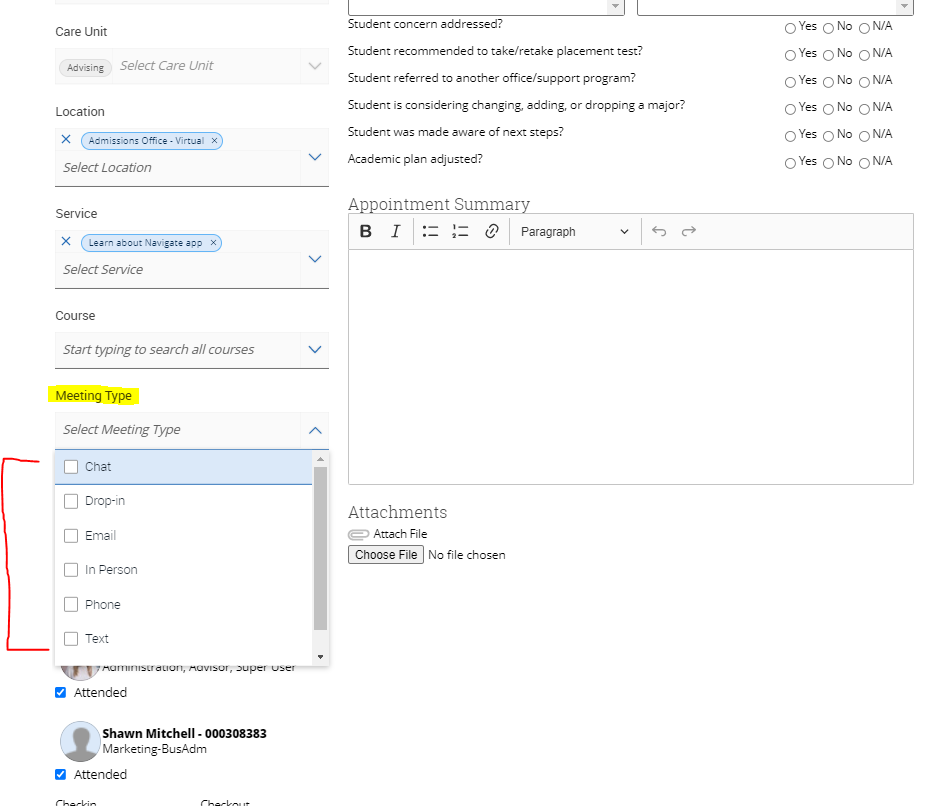
If you have an advising interaction with a student/ advisee via phone or email did you know that you can log in to the Appointment summary and simply click on "meeting type" and this is where you will find phone, email, in person, virtual .. etc , click the appropriate type and document your interaction. ( see below)
We recommend only using Navigate to input Summaries instead of DegreeWorks(notes) because when we upload DW notes data into Navigate- it will be duplicated and we don't want that.
With the recent release of Meeting Types, please watch this videoto learn how to add availability with meeting types which will indicate to students how you are able to connect with them (i.e., virtual/in-person/email).
Bookmark Navigate Google Site for all office hours, Quick Start Guide, request forms, how-to guides, and recordings.
Beth Breton, Kelly Champagne, Eric Farrell, Andrew Fletcher, Mark Hudgik, Lauren LeClair, Mi Jin Park, Myriam Quinones, Linda Scott, Renee Tastad, Linda Szalankiewicz, Allison Wrobel