| | |
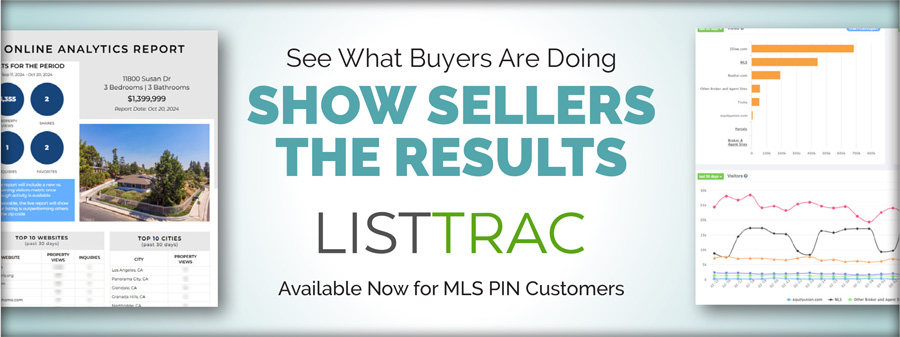
Your Listings Are Getting Views. ListTrac Shows You Where.
Your listings are getting attention, but do you know where it comes from? ListTrac gives you a clearer picture of how your listings are performing online. With activity insights at your fingertips, you can fine-tune your marketing, better understand where interest is coming from, and show sellers the reach their property is getting.
MLS PIN customers will automatically receive a complimentary sample listing activity report by email for each new listing, highlighting key metrics such as views, leads, shares, and favorites across real estate portals, broker websites, and Pinergy. You can opt out of these emails at any time.
Want to see more? Visit ListTrac in Pinergy’s Tools to start a free seven-day trial and access expanded analytics, more detailed reporting, and the ability to automatically send listing performance reports directly to sellers. Access is easy, too. You’ll also find a ListTrac button in Pinergy’s Listings Manager, giving listing agents quick access to activity for their listings, office admins access to listings across their office, and brokers access to listings across their brokerage.
With real data behind your marketing, you can see what’s getting attention, better understand how your listings are performing online, and bring meaningful data into conversations with your sellers. Less guessing, more insight, and more ways to show the value you bring to the table.
| | | | |
A Better View Is Coming with Broker StatDash
A powerful new view of your business is coming to Pinergy. Broker StatDash will give brokers and managers an at-a-glance statistical view of office inventory, sales activity, agent and team performance, and trends, with the ability to dig deeper when they need more detail.
Broker StatDash brings a wealth of office data together in one convenient place. See inventory broken down by property type and status, compare agent and team activity and rankings, and track performance trends for your office as a whole or for individual agents and teams. Analyze results by units or dollar volume, make year-over-year comparisons, and drill down to the listings behind the numbers.
Whether you want a quick snapshot of how your office is performing or a closer look at the details driving the results, Broker StatDash will make it easier to see the full picture without piecing information together from multiple places. Brokers and managers will be able to access Broker StatDash from Pinergy’s Tools and add it to their Quick Links for easy access.
A better view of your business is just around the corner. Watch Pinergy’s News & Notes for updates on the launch of Broker StatDash.
| | | | |
Coming Soon Listings (CSO) Gain Expanded Visibility
Attention, brokers and managers: Coming Soon (CSO) listings are now a lot more visible.
In addition to appearing in Pinergy, CSO listings are now sent by default to brokerage websites (IDX), Virtual Office Websites (VOW), and your office’s “opted-in” real estate portals (Syndication).
You’ll still have control over where your listings appear. The Office Management tool lets brokers and managers choose whether an office's CSO listings are sent to brokerage websites and real estate portals. If needed, Listings Manager also allows you to opt individual CSO listings out of either destination.
| | | | |
Meet Pinergy’s New Floor Plan Gallery
Floor plans are one of the most valuable tools for helping buyers understand a property’s size, layout, and flow. Now, Pinergy makes them even easier to access with the new floor plan gallery.
Listings that include one or more floor plans in the photo gallery now display a floor plan icon, making them easy to identify at a glance. Select the icon to open a dedicated gallery featuring only the listing’s floor plans for quicker, more convenient access.
Take a quick look at the floor plan gallery in action!
| | | | |
AI Generate Is Doing More for Your Listings
Pinergy continues to enhance its AI features. The AI Generate function, which uses Restb.ai’s AI photo analysis to help create new listings, was recently updated to improve performance and recognize a wider variety of property features in listing photos. AI Generate is also now available for Residential Rental and Mobile Home property types, expanding beyond single-family homes and condominiums.
Save time when entering a new listing into Pinergy. Simply click the AI Generate button and upload your listing photos. Restb.ai’s AI technology will analyze the images to identify and select property features and even label your photos for you.
Ready to put AI Generate to work? Check out our AI Generate to Add Property Features and Photo Labels flyer to get started.
| | | | |
Status Changes? Check Your Texts.
Listings move fast, and Pinergy’s text alerts can help you keep up. Use Listing Watch to receive instant text alerts when the status changes on up to 50 specific listings or use Hot Sheets to receive alerts when new results match your saved changes.
To enable text alerts, go to Options & Settings and select Manage Text Alerts on desktop or Text Alerts on your smartphone. Enter your mobile number and select Authorize. Once your number is authorized, you can choose to receive Listing Watch alerts, Hot Sheets alerts, or both. You can also disable text alerts between 10 p.m. and 6 a.m.
To add a listing to your Listing Watch, select the Watch (bell) icon at the top of the listing details. Select the Alert Notes (dialog) icon to add notes that will appear in the listing’s alert text.
To receive hot sheet text alerts, select Text in the Alerts section of the Hot Sheet Search Settings. You can also choose to receive alerts by email. Select your preferred alert frequency, then save your hot sheet.
See it in action! Watch our Pinergy’s Listing Watch and explore Responsive Hot Sheets videos for more.
| | | | |
Fine-Tune Your Mobile Search
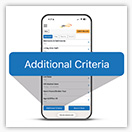
Pinergy’s Mobile Search, optimized for smartphones, keeps getting better. With the new Additional Criteria button at the bottom of the search screen, you can quickly access even more popular search fields and narrow down results right from your phone.
Looking for something specific? Simply start typing a feature, such as "pool," to see matching search fields. Select the field you want, choose your criteria, and tap “Apply” to add it to your search. It’s that easy.
With more criteria at your fingertips, Mobile Search makes it easier to find what you need from your phone. If you haven’t used it in a while, now is a great time to give it another try. It’s Pinergy search, made for when you’re on the go!
| | | | |
School Information? It’s on Pinergy’s Maps
There’s more to Pinergy's Maps than streets and property lines. With school locations, district boundaries, enrollment details, and more built right in, helpful information about local schools is only a few clicks away. Zoom in on the map and select the Schools layer to view school districts or locations. Click a school icon to see details including the school’s name, address, phone number, district, school type, enrollment, and number of teachers.
You can also access school details from a listing preview. Click View Schools to see information related to that property, map nearby schools and district boundaries, and access links to district websites.
Looking at a specific property on the map? Select School Information in the Parcels layer, then click a parcel to view its school details, including links to school websites. Whether you’re researching a listing or helping a client learn more about an area, Pinergy's Maps make it easy to find useful school information without going far.
| | | | |
Keep Recently Viewed Listings Within Reach
Need to revisit a listing without running another search? Select “Recent Views” from Pinergy’s main navigation to access up to 1,000 of the listings that you most recently viewed. Use the 1-Line w/Date Viewed summary view or apply the Date Viewed field to other summary views to organize results the way you prefer.
| | | | |
You Had Thoughts. We Took Notes.
A big thank-you to everyone who shared their thoughts in our recent technology survey! You told us what’s working, what could work better, and how our technology can do more to support your business. We’re all ears.
Your feedback gives us valuable insight into your experience with Pinergy and our other technology offerings and will help guide us as we look ahead.
And now for the fun part! Congratulations to our three $100 Amazon gift card winners: Maureen Mazrimas of Duhallow Real Estate, Deanna Blais of ERA Key Realty Services – Distinctive Group, and Andrea Petrino of RE/MAX Realty Plus! They’ll also receive some MLS PIN swag to sweeten the win.
Thanks again for taking the time to weigh in. Your feedback helps shape what comes next.
| | | | |
Remember to Double-Check Your Expiration Date
Every listing in MLS PIN must include a definite and final expiration date that matches the written listing agreement with the seller. Before submitting a listing to Pinergy, take a moment to confirm that the expiration date has been entered correctly. Using the correct expiration date helps ensure the listing accurately reflects the timeframe authorized by the seller.
| | | | |
Employee Spotlight
Pushpanjali Davuluri, Application Developer
Pushpanjali Davuluri, better known around MLS PIN as “Pushpa,” joined our team as an Application Developer in 2025. Working alongside our development team, she helps build and enhance Pinergy applications, troubleshoot issues, and test behind the scenes to keep everything running smoothly.
And Pushpa knows her stuff. Before joining MLS PIN, she was a Senior Software Engineer at IBM! Today, she enjoys tackling challenges, learning along the way, and creating tools that make Pinergy easier to use. One project she’s especially proud of is the Recent Searches feature, and she’s currently working to help ensure tax records display accurately in Pinergy’s Maps.
Outside of work, Pushpa enjoys trying new recipes and spending time with her baby girl, whom she welcomed in May. Congratulations to Pushpa and her family, and thank you for everything you do for MLS PIN and the customers who count on Pinergy every day!
| | | | |