|
Pros and Cons
Pros
- Faster form completion for travel, government sites, and secure verifications.
- Useful across multiple devices.
- Reduces error rates in long numeric fields.
Cons
- Requires trust in local device security.
- Some government portals may block autofill.
- Rollout varies, so not all users may see the feature immediately.
Real-World Examples
-
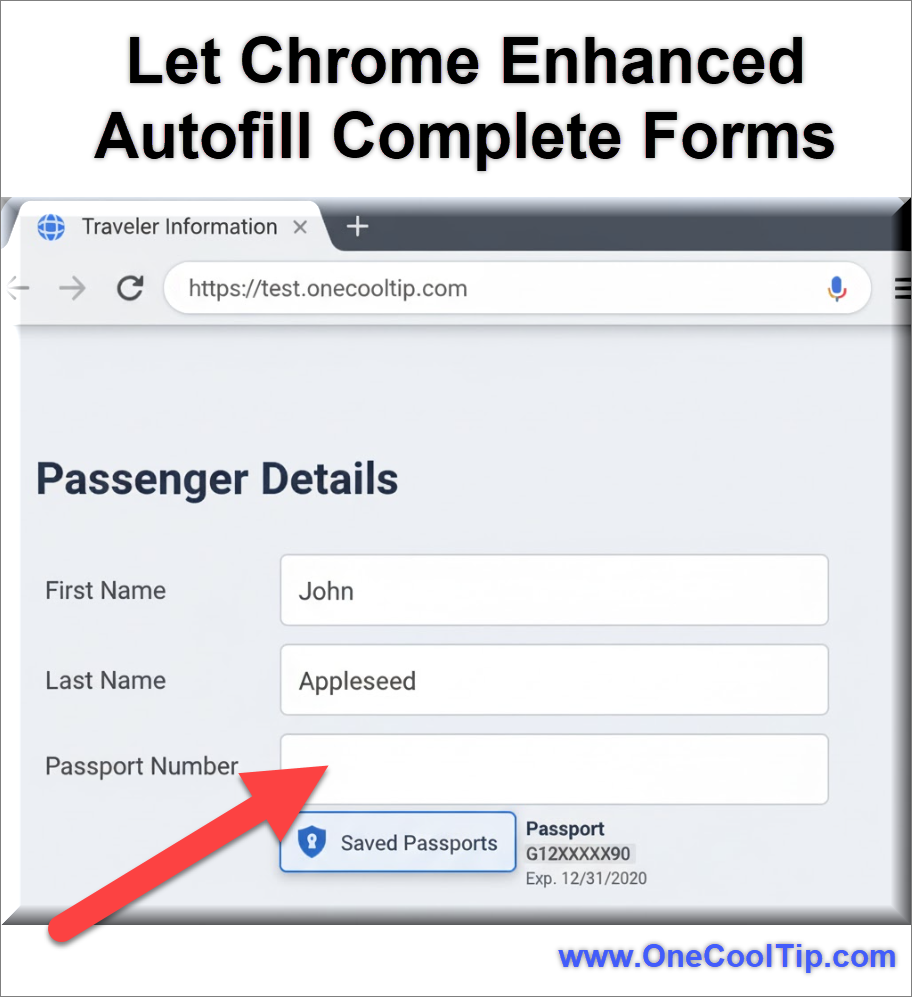
Business travel: You book international flights monthly. Chrome fills passport details on airline and hotel sites without searching through email or photos.
-
Home users: Renewing car registrations becomes painless because Chrome fills your plate and VIN numbers with a single tap.
Configuration Guide
You can turn Enhanced Autofill on or off in Chrome’s Autofill settings.
Each ID type appears as a separate entry. Editing, viewing, or deleting stored information always requires authentication through your device lock or system password.
Chrome sync is optional but recommended if you want access across devices.
Feature Access
This Enhanced Autofill capability for documents like passports, driver’s licenses, and vehicle information is available to users globally across all languages as part of the standard Chrome update.
This is a core Chrome feature and does not require a paid subscription.
Desktop (Windows, macOS, Linux): The feature is available for all desktop users with the Enhanced Autofill option enabled in settings.
Mobile (iOS and Android): The enhanced support for passports, driver's licenses, and vehicle details is currently rolling out to the Chrome mobile apps.
While the ability to save passwords and addresses is fully functional, users on iPhone and Android devices may not see the specific setup or management options for these new document types yet.
Keep your Chrome app updated to receive the feature as the global mobile rollout continues.
Score
Criterion | Score (0–10) | Justification
Value 9
Saves time on tasks that normally slow users down and reduces typing errors.
Usability 8
Straightforward setup on all devices with minimal friction.
Wow Factor 7
Expands autofill into new territory, though not a flashy feature.
Total: 24/30 👍 Good
The feature compares well to Apple Wallet’s ID storage but is more flexible for web-based workflows.
Key Takeaways
Enhanced Autofill expands Chrome’s usefulness beyond passwords and addresses.
It removes friction from everyday tasks that require ID numbers and allows secure access across devices.
Users who travel or complete forms often will benefit most.
Cool Tip Snapshot
Feature Name: Chrome Enhanced Autofill.
Platforms: Windows, Web. (rolling out: iOS, Android)
Quick Benefit: Faster and more accurate ID entry.
Access Type: Free, currently rolling out.
Try It Yourself
Head into Chrome settings today and add your passport or driver’s license so your next form fills instantly.
Then share the article with your team, family, and friends, and subscribe to the One Cool Tip Newsletter for more time savers.
READ MORE
Read the Full Cool Tip HERE.
|