|
Microsoft Secure Boot Certificates To Expire For First Time Since 2011
Well, for the first time since 2011, Microsoft if expiring their secure boot certificates. Starting in April, Microsoft updates started pushing the new certificates in place for many computers. The change is to help in patching security vulnerabilities that were discovered.
What Does This Mean For Me?
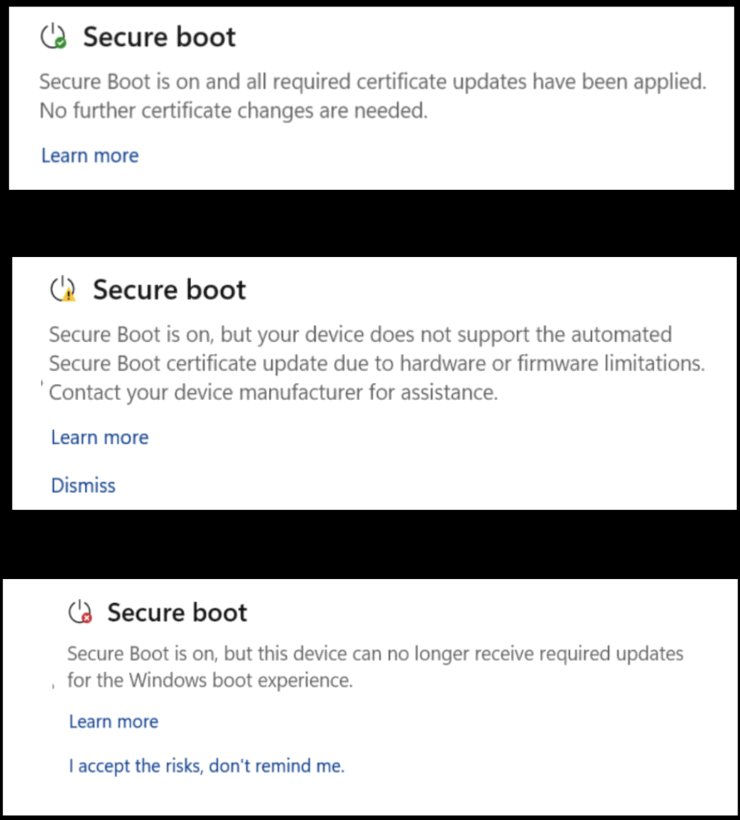
The process should be seamless for most users - as long as you're on Windows 11, the new certificates were likely already downloaded. It also would have come with newer certificates if the computer was replaced in the last year or so. Users can check to see if their computer is compliant or not by going to the "Device Security" app. This will display one of the three messages displayed at the top of this email. The green check means you're good, the yellow means there's work to do, and the red means the computer can't receive updates.
Once the certificate expires, it will not make your computer stop working. Things should work as normal. It does, however, leave the computer open to a vulnerability - one that will be exploited more and more now that it has been brought to people's attention with the announcement of the fix.
Users who need assistance troubleshooting an un-updated certificate and who need to get new computer or have Window 10 devices removed from the network should reach out to see how our office can best assist you with addressing those concerns ahead of the June expiration timeline currently in place.
|