Online@JSU This Week | 5.6.26

Honorlock 1.3 Now Available in Canvas


As we prepare for the summer term, we encourage all faculty using Honorlock to enable Honorlock 1.3 in their Canvas courses.


This updated version functions the same as the current Honorlock experience you’re familiar with. No major changes to your workflow or your students’ testing process. However, behind the scenes, Honorlock 1.3 includes enhanced security improvements and system updates designed to provide a more robust and reliable proctoring environment.

🕓 Incomplete Grades?


Request Extended Access by submitting the "Request Student Access for Incomplete Grade Completion" Form on our Forms and Requests for Faculty webpage. 

📢 Reminder for Faculty

Summer classes begin tomorrow!


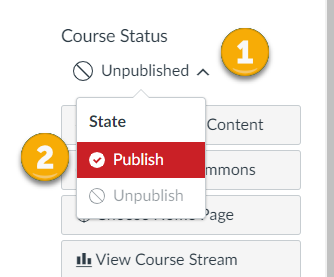
Don’t forget to publish your course so students can access it:

  1. Navigate to the course homepage.
  2. Click the arrow next to Unpublished [1].
  3. Select Publish [2].

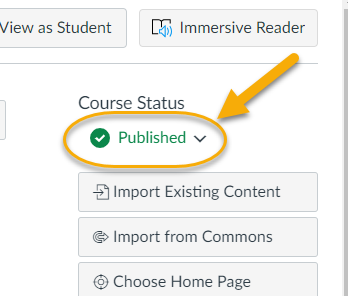
The text of the word 'Published' will change to the color of green when published. Students can now access the course.

Canvas course has been published

Important Reminders:


Course Navigation Menu Links - Academic Policies, Academic Support, and Tutor.com should not be removed from your course navigation menu in Canvas. These links support university initiatives.


Early Course Access - Instructors can grant early course access to students in Preview Mode before the first day of class. Students can access course content but cannot participate in the course (assignments/discussions) until May 7th. 


Check eBook links - If you or your students experience any issues accessing your eTextbook via the JaxBooks course menu navigation link in your Canvas course, please contact the JaxState Campus Bookstore for assistance.

If you do not see JaxBooks in your Canvas course navigation, and know it is necessary for your course, or if you see JaxBooks in your Canvas course but have confirmed that it is not required, you can follow the instructions located on the Faculty Tutorials webpage, within the Textbooks section, to enable or disable the JaxBooks LTI in specific courses. Note: If you are unsure whether the JaxBooks LTI should remain enabled in your course, please contact Kristi Webster at KWebster@bncollege.com. Provide her with your course and section details so she can help you confirm whether JaxBooks is relevant for your students in that course and section

Accessibility Progress & What’s Next


There’s been a recent update to federal accessibility requirements that impacts our ongoing work in Canvas and other digital course materials. The compliance timeline has been pushed back to next year, giving us more time to continue strengthening our efforts.


Even with this extended deadline, the focus remains the same: making steady, intentional improvements to ensure all course content is accessible to every student.


As you move into course updates and future planning, keep accessibility in mind as part of your regular workflow. Small, consistent updates like improving document formatting, addressing flagged issues in Panorama, and designing with accessibility in mind from the start will help us reach full compliance without last-minute stress.


Want more details? Check out: DOJ Extends Web Accessibility Deadline


Thank you for continuing to prioritize inclusive course design and student success.

Online Learning Readiness Self-Assessment Now Available


We’re excited to share a new resource designed to support prospective online students at Jax State!


Faculty can now direct students to our new Online Learning Readiness Self-Assessment.


This quick, interactive tool helps students evaluate whether online learning is a good fit for their lifestyle, time management skills, and learning preferences. It’s a great way to set expectations early and encourage student success before they enroll.


How you can use this:

  • Share the quiz with prospective or newly admitted students
  • Include it in advising conversations or email communications
  • Add it to course welcome materials or program webpages


By guiding students to this resource, you can help ensure they are better prepared and more confident as they begin their online learning experience.


If you have questions or would like help incorporating this into your courses or communications, feel free to reach out to Online@JSU.

Thank you for supporting student success!

❓ Canvas FAQ Corner


Quick answers to common Canvas questions from faculty like you!


📌 Q1: How do I add quiz questions to videos in Canvas Studio?

A: Within Studio, select a video and use the Quiz option to insert questions at specific timestamps. These can be graded and synced with the Canvas gradebook, making them a great low-stakes engagement tool.


📌 Q2: Do students need to install anything to use Honorlock?

A: Yes. Students must install the Honorlock Chrome extension before taking a proctored exam. It’s best practice to communicate this early and provide a low-stakes practice quiz so they can test their setup.


📌 Q3: Can students see their similarity reports on Turnitin?

A: Yes, this is controlled in your settings. Allowing students to view reports before the due date can support learning by helping them revise and improve their work.


📌 Q4: What’s a simple way to improve student engagement?

A: Frequent communication goes a long way. Post weekly announcements, include short video updates, and use discussion boards to encourage interaction. Even small touches can significantly increase participation.


📌 Q5: What similarity score is “too high” for Turnitin?

A: There is no universal threshold. A high score doesn’t automatically indicate plagiarism. It may reflect properly cited sources or common phrases. Always review the report in context before making a determination.

Helpful

Resources and Links from Online@JSU


Online@JSU office logo

Questions or Comments?


Visit our website, email us at online@jsu.edu, or call us at 256-782-8172.


We look forward to hearing from you!

Facebook