|
Searching for resources in a research database works differently than your typical Google search. While online search engines are great for finding a large amount of information very quickly, databases are designed to be precise. The upside to searching in a database is you can find resources that match your research topic exactly. The downside is they don't always accommodate natural language searching well.
Here are some tips for building an effective search in a research database.
Step 1: Write out your research question.
Write out what you hope to learn through your research. It's okay if your question evolves or changes along the way. You can always adjust as you learn more about your topic.
As an example for this guide, we will be exploring the question "What is the impact of gamification strategies on student motivation in elementary school?"
Step 2: Identify the key concepts of your research question.
These are the nouns, people, places, ideas and time periods that define the basis of your question. Think of it as your research question without filler words.
Key concepts from our example question would be:
- Gamification
- Student motivation
- Elementary school
Step 3: Turn your key concepts into keywords for your search.
Our key concepts make good keywords for a search. However, not every resource will use the same vocabulary. To enhance our search, think of synonyms and related terms for your key concepts to create additional keywords.
- Gamification ➡️ gamify, game-based learning
- Student motivation ➡️ student engagement
- Elementary school ➡️ primary school, grade school, K-5
Step 4: Turn your list of keywords into a search string using Boolean operators.
Boolean operators tell the database how to search for your keywords. There are three operators in a search string: AND, OR, and NOT.
-
AND narrows a search, requiring that any keywords linked by AND be present.
-
OR broadens a search, and is used to link related terms. Keywords linked by OR will retrieve results with either keyword present.
-
NOT narrows your search, telling the database to exclude any terms you don't want present in the results. Only use when needed.
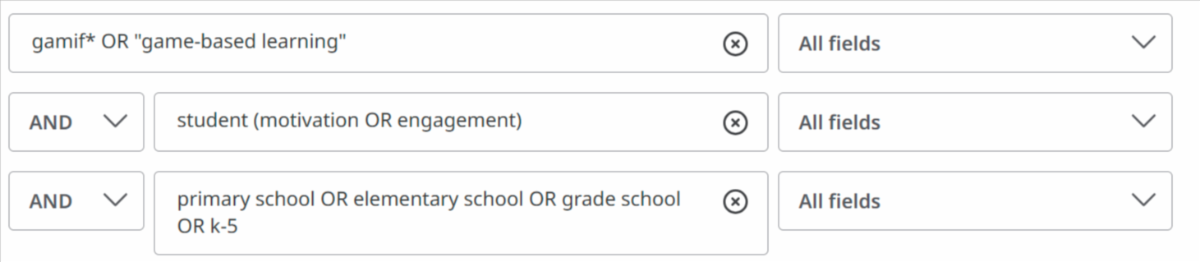
The advanced search functionality of most research databases include separated fields to help you build your search string. Below is a possible search string for our research question demonstrated in the database Education Research Complete.
|